Copy This First
If your free website URL already works, do not rush to buy a domain.
Send this to Codex:
I already have a free website URL that opens:
paste the pages.dev or other free URL

I am considering whether to connect my own domain.

Please do not make me buy a domain yet, and do not make me change DNS yet.
First help me decide:
1. whether a domain is worth buying now;
2. whether the free URL is enough for now;
3. how I should choose domain name candidates if I do buy one;
4. which later pages will require me to sign in, authorize, or confirm;
5. which operations are risky and must stop for my confirmation.

Use ordinary language. Do not start with a DNS lesson.
The goal is not to become a domain expert. The goal is to know whether you need a domain, and what to paste back when an unfamiliar page appears.
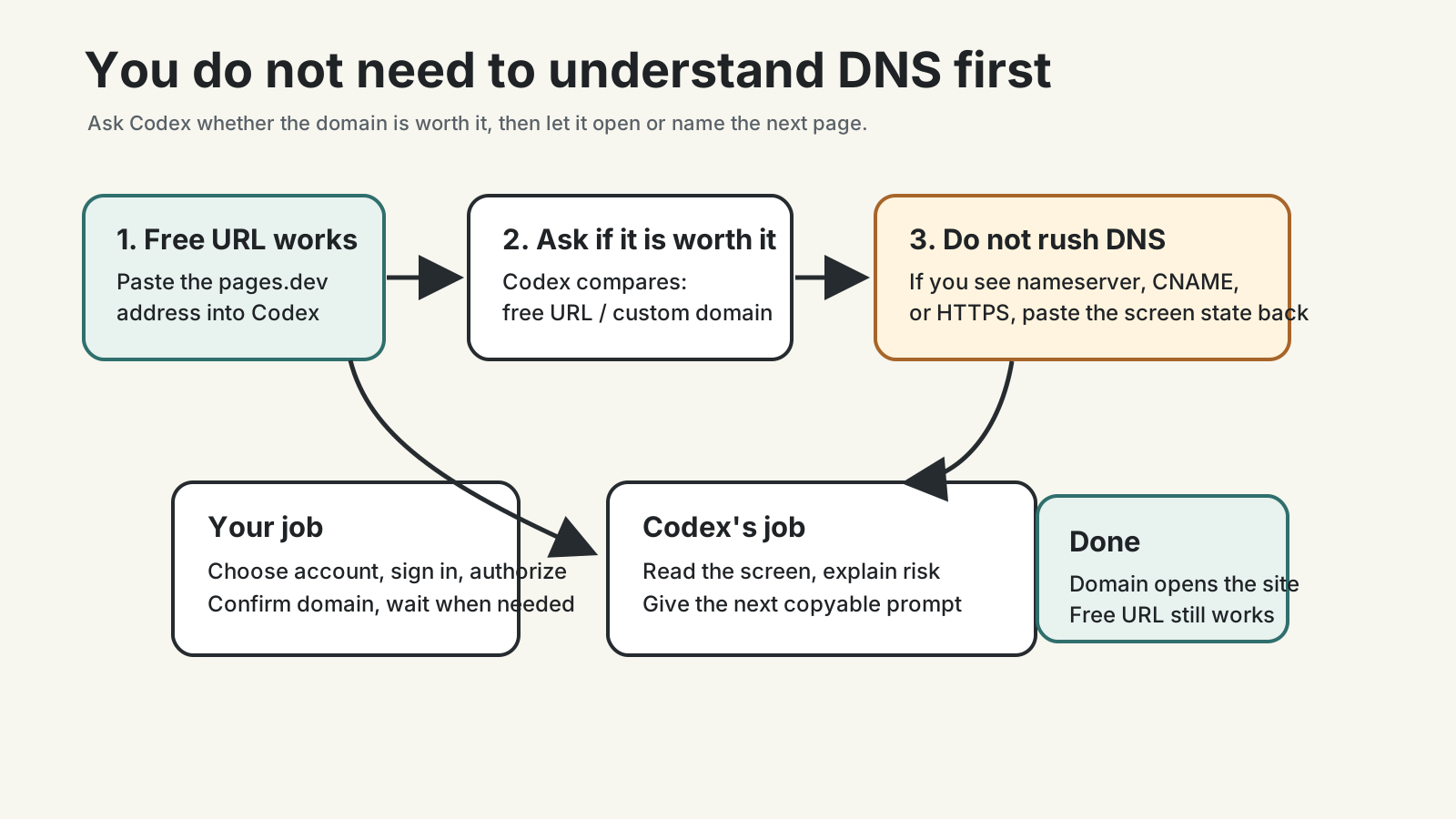
If You Only Want To Decide
A domain is like a street address. It is not the house itself. If the site opens on a free URL, you can already use it.
If you are not sure you will keep updating the site, stay with the free URL.
If you plan to put the site on a resume, profile, business card, or long-term public archive, a domain may help.
Ask:
Please judge whether I actually need a domain now.

My situation:
- who this site is mainly for:
- how often I expect to update it:
- whether I will put the URL on a resume or public profile:
- whether I am comfortable renewing a domain every year:

Give me a clear recommendation: buy now, wait, or do not need one.
If Codex Asks For Domain Candidates
For a first domain, do not chase strange, clever, or flashy names.
Prefer something:
- easy to say;
- easy to spell;
- not embarrassing next year;
- unlikely to be confused with a company, institution, or someone else’s brand.
Give candidates to Codex:
I am choosing a domain for my personal website.

Candidates:
1. first candidate
2. second candidate
3. third candidate

Please judge them from an ordinary visitor's perspective:
- which is easiest to remember;
- which is hardest to misspell;
- which fits a long-term personal site;
- which could be misunderstood;
- which ones are not worth buying.

Do not purchase anything. Only give judgment.
If you have no candidates, Codex can suggest some from your name, work, or long-term topic. Still read them out loud before buying.
If You Already Bought The Domain
After buying, do not click around settings by memory.
Send:
I already bought this domain:
paste the domain

My free website URL is:
paste the current working URL

Please help me decide the next step.
Rules:
1. first tell me which website or page I should open now;
2. if I need Cloudflare Pages custom domain, tell me what the page is probably called;
3. if I need to change settings at the domain registrar, explain the risk first;
4. if I see nameserver, CNAME, DNS, or HTTPS, tell me which information to paste back to you;
5. do not make me operate from memory.
The important phrase is “do not operate from memory.” Domain settings are not like changing one sentence. A wrong click may take time to undo.
If You See Cloudflare Or Registrar Pages
You may see pages such as:
- Custom domains in Cloudflare Pages;
- DNS settings at the domain registrar;
- nameserver settings;
- CNAME records;
- HTTPS or certificate status;
- a status such as pending, verifying, or active.
Do not memorize those words. Paste the page state back:
I am looking at this page:
paste the page title or main message

The page includes these words:
paste nameserver, CNAME, DNS, HTTPS, pending, active, or similar text

Please decide:
1. whether this is the right page;
2. whether I should only confirm, copy information, or actually change a setting;
3. which button is safe to click and which button I should avoid for now;
4. if I need to wait, what status I should wait for.
If the page includes account, email, payment, or private information, do not share a full screenshot with untrusted people. Copy only the text related to domain setup.
If The Domain Does Not Work Immediately
Domain setup is often not instant.
You may see:
- verification in progress;
- DNS still updating;
- HTTPS certificate still preparing;
- the free URL works but the custom domain does not yet.
Do not keep changing random settings. Say:
The domain connection has not succeeded yet.

Current state:
- whether the free URL opens:
- whether the custom domain opens:
- status text shown on the page:
- settings I just changed:

Please decide whether I should wait or whether something is wrong.
Do not make me restart the whole process.
Sometimes the correct move is waiting.
Keep The Free URL For Now
Even after the custom domain works, keep the free URL at first.
The free URL is a spare key. If the custom domain is still updating, the certificate is still preparing, or you later break a domain setting, the free URL helps you confirm that the site itself is still fine.
Decide later whether to disable it, after you understand redirects, search visibility, and your long-term domain plan.
Done Means This
This step is complete when:
- you know why you bought a domain, or why you waited;
- the free URL still opens;
- if you bought a domain, the custom domain opens the site;
https://works;- the site opens on your phone;
- you did not change DNS blindly;
- when an unfamiliar page appears, you know to paste the page state back to Codex.
If this step feels annoying, stay with the free URL. A maintained free address is worth more than a custom domain you never update.
Next: Step 5: Keep editing the site after it is online.
References
Public social links