One Clear Statement
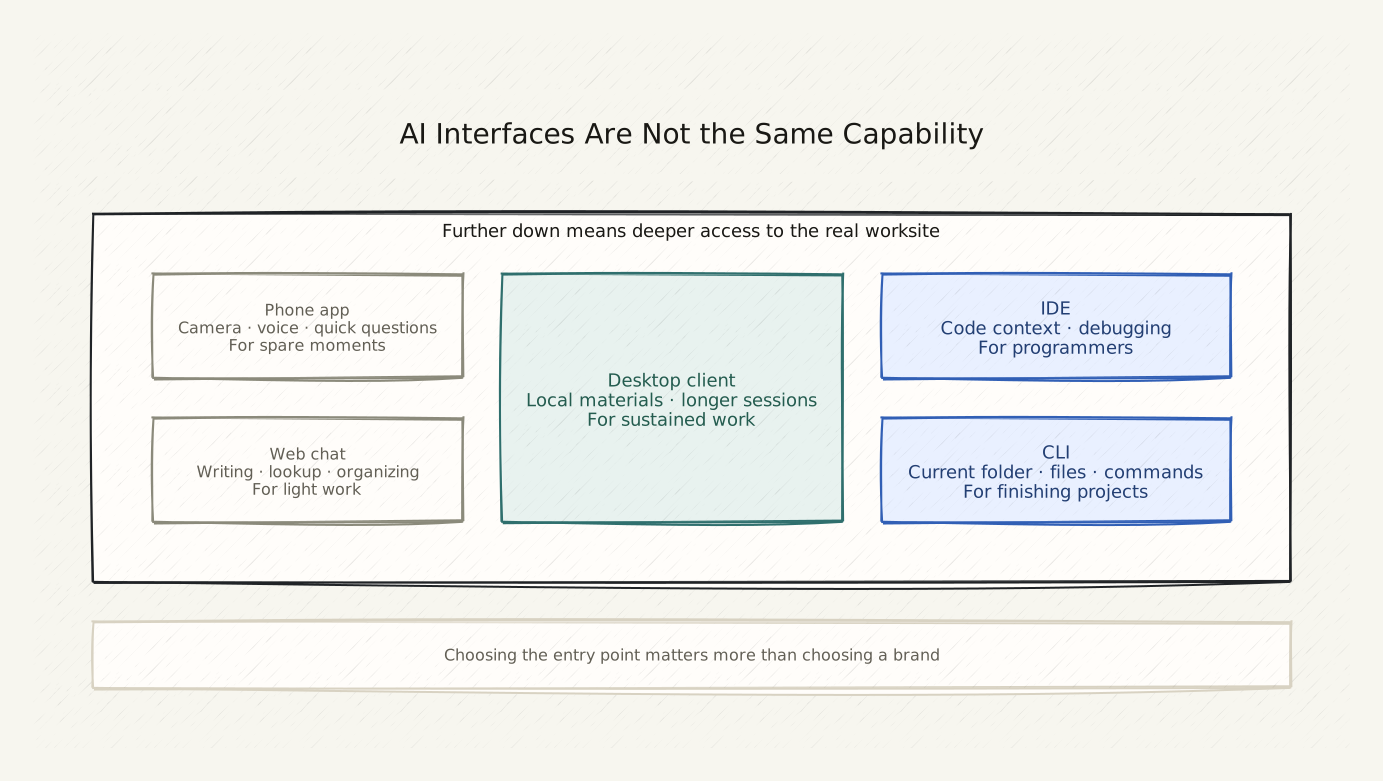
The same AI in a different interface can do completely different things. Choosing the right interface matters more than choosing the right product.
Copy This First
I am using [your current interface, e.g. ChatGPT web / Codex CLI].

I want to [your goal].

Please tell me: can this interface handle this task?
If not, which interface should I switch to? After switching, how do I tell it the same goal?
Six Comparison Dimensions
Remember one principle first:
The value of an AI tool is not what it is called — it is whether it can reach the task you have right now.
Use these six questions to evaluate any interface:
| Question | What It Means |
|---|---|
| Can it read local files? | Can it see your documents, images, folders? |
| Can it edit files? | Can it create or modify files in your directory? |
| Can it run commands? | Can it open programs, run scripts, execute checks? |
| Can it connect to external tools? | Can it open a browser, send API requests, link accounts? |
| Can it handle a project long-term? | Can you close the window and come back to continue? |
| Is it mobile-friendly? | Easy to use on the go, or desktop-only? |
Five Interface Types
Phone App / Voice
Good for: Quick questions, photo-based queries, voice input, anything you suddenly remember to look up
Not good for: Editing files, working on projects, long sessions
Examples: ChatGPT App, Kimi App, Claude App, Doubao
Web Chat
Good for: Writing, rewriting copy, complex questions, research, organizing thoughts
Not good for: Reading or editing your local files and folders
Examples: ChatGPT web, Claude.ai, Kimi web
Note: Web chat cannot access files on your computer. It can only see what you paste into it.
Desktop Client
Good for: Long conversations, processing local materials, occasionally reading local files
Not good for: Large projects with multiple files working together
Examples: Cursor, Notion AI, MacWhisper, Obsidian Copilot
IDE (Code Editor)
Good for: Writing code, handling multi-file projects, programmers or near-programmers
Should ordinary people use IDE? Codex can run in the terminal — no IDE interface required. The main value of an IDE for non-programmers is: a fixed project window that shows the file list and chat side by side.
Examples: VS Code + Codex extension, Cursor (which is essentially an IDE), Windsurf
CLI (Command-Line Window)
Good for: Turning one specific directory into an AI workstation, reading files, editing projects, running checks, deploying
Not good for: Absolute beginners on first use — but once you know it, it is not hard
Examples: Codex CLI, Claude Code CLI, GitHub Copilot CLI
Which One Should You Use
| Situation | Recommended Interface |
|---|---|
| Quick question on the go | Phone app |
| Writing an article or editing copy | Web chat |
| Organizing files on your computer | CLI |
| Building a personal website | CLI |
| Turning a recording into text | Desktop client |
| Making AI generate a PPT slide | Generative AI web/app |
| Research with source links | Search AI |
| Processing a project that requires reading many files | IDE + CLI |
A Reusable Prompt
Not sure which interface to use?
I want to [your goal] and I am not sure which tool to use.

Please tell me:
1. Do I need an interface that can read my local files?
2. Do I need an interface that can edit my folder?
3. Which type of interface fits what I am trying to do right now?
If You See This
An app says it cannot handle a file:
Copy and paste the file content in. Apps do not support direct local file access, but you can manually paste text content for it to see.
Web version does not know what is on your computer:
Normal. Web interfaces cannot access your file system. Either paste the content you need, or switch to an interface that can access local files (CLI).
IDE looks too complicated:
You do not need to use an IDE. Codex can run directly in the terminal — no separate code editor interface needed. An IDE is a convenience, not a requirement.
How to Know You Are Done
You do not need to memorize every interface.
After reading this page, you only need to do one thing:
When facing an AI task, first ask: does this task require reading my files or editing my folders? If yes, use CLI or IDE. If it is just asking questions or writing, an app or web interface is enough.
Next: Why Ordinary People Can Use CLI Too — removing the fear of the command line.
Hint: The same AI company usually offers multiple interfaces. For example, OpenAI has ChatGPT as an app, web, and API — but only Codex (CLI) can directly read your folders. Choosing an interface means choosing what capabilities you get.
Public social links